

CLI Benchmark: 4-Way Comparison
Benchmark date: 2026-03-15 | Claude Sonnet 4.6 on AWS Bedrock | N=3 runs | 6 tasks | Single Bash toolOverview
Four CLI browser automation tools compared head-to-head. Each tool gets a single generic Bash tool (identical overhead) with an optimized system prompt. The LLM drives each tool autonomously to complete 6 real-world browser tasks.Methodology
- Model: Claude Sonnet 4.6 on AWS Bedrock (Converse API), us-west-1
- Tool: Single generic Bash tool for all 4 approaches (identical tool-definition overhead)
- System prompts: Per-approach optimized prompts with tool-specific commands and optimization tips
- Fairness: Both approach order AND task order randomized per run (eliminates OS/DNS caching bias)
- Browser: Persistent daemon per approach across all 6 tasks, headless mode, browser cleanup between approaches
- Statistics: N=3 runs, 10,000-sample bootstrap for 95% confidence intervals
- Tasks: Same 6 tasks as the MCP benchmark (fact_lookup, form_fill, multi_page_extract, search_navigate, deep_navigation, content_analysis) against live websites
- Benchmark script:
benchmarks/e2e_4way_cli_benchmark.py - Results data:
benchmarks/e2e_4way_cli_results.json
Tasks
Fairness Design
Unlike MCP benchmarks where each server defines its own tools (different counts, different schemas, different token overhead), this CLI benchmark uses a single Bash tool for all 4 approaches. This eliminates the tool-definition advantage — the only difference is the system prompt telling the LLM how to use each tool. Additional fairness measures:- Randomized approach order: Each run shuffles which CLI goes first, preventing later approaches from benefiting from OS/DNS caching
- Randomized task order: Each approach sees tasks in a different order per run
- Persistent daemon: All 4 tools keep a browser session alive across 6 tasks (no cold-start advantage)
- Browser cleanup: Stale browser processes killed between approaches
- Headless mode: Eliminates rendering overhead differences
Results: Overall
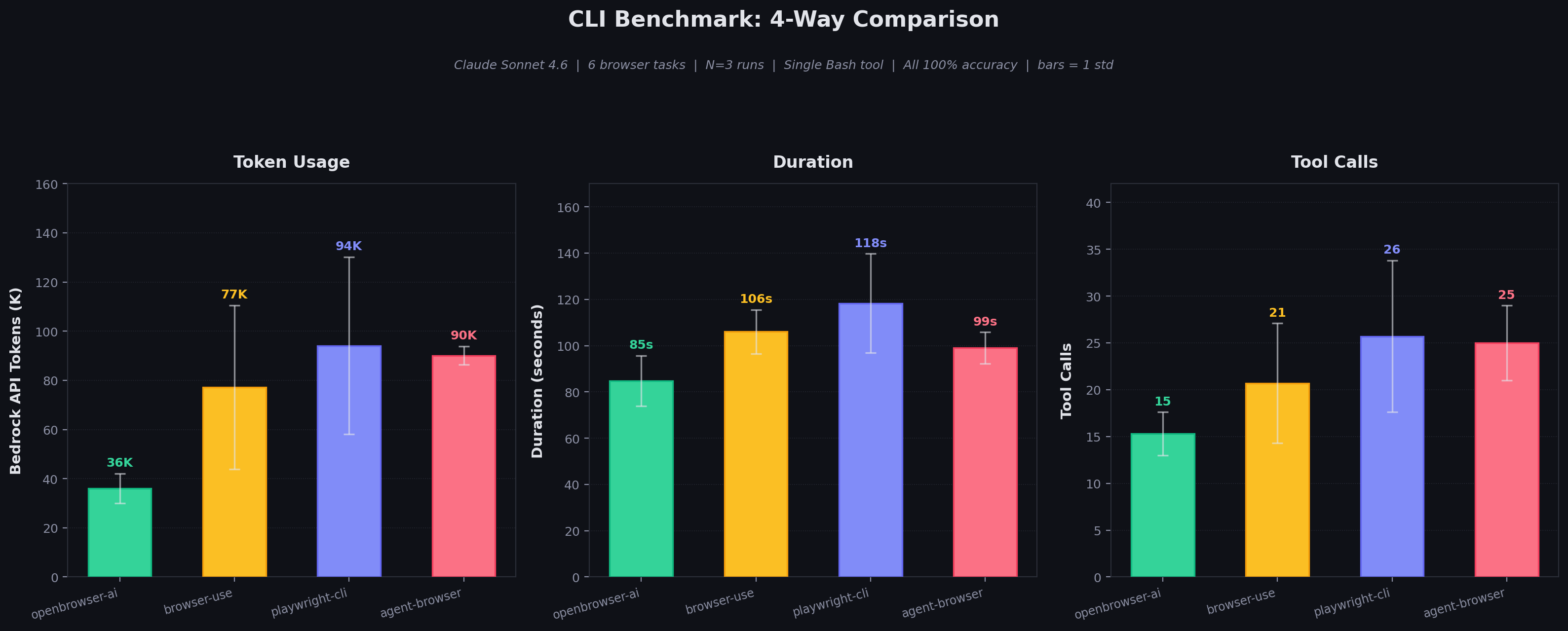
All 4 tools achieve 100% accuracy (18/18 task executions across 3 runs).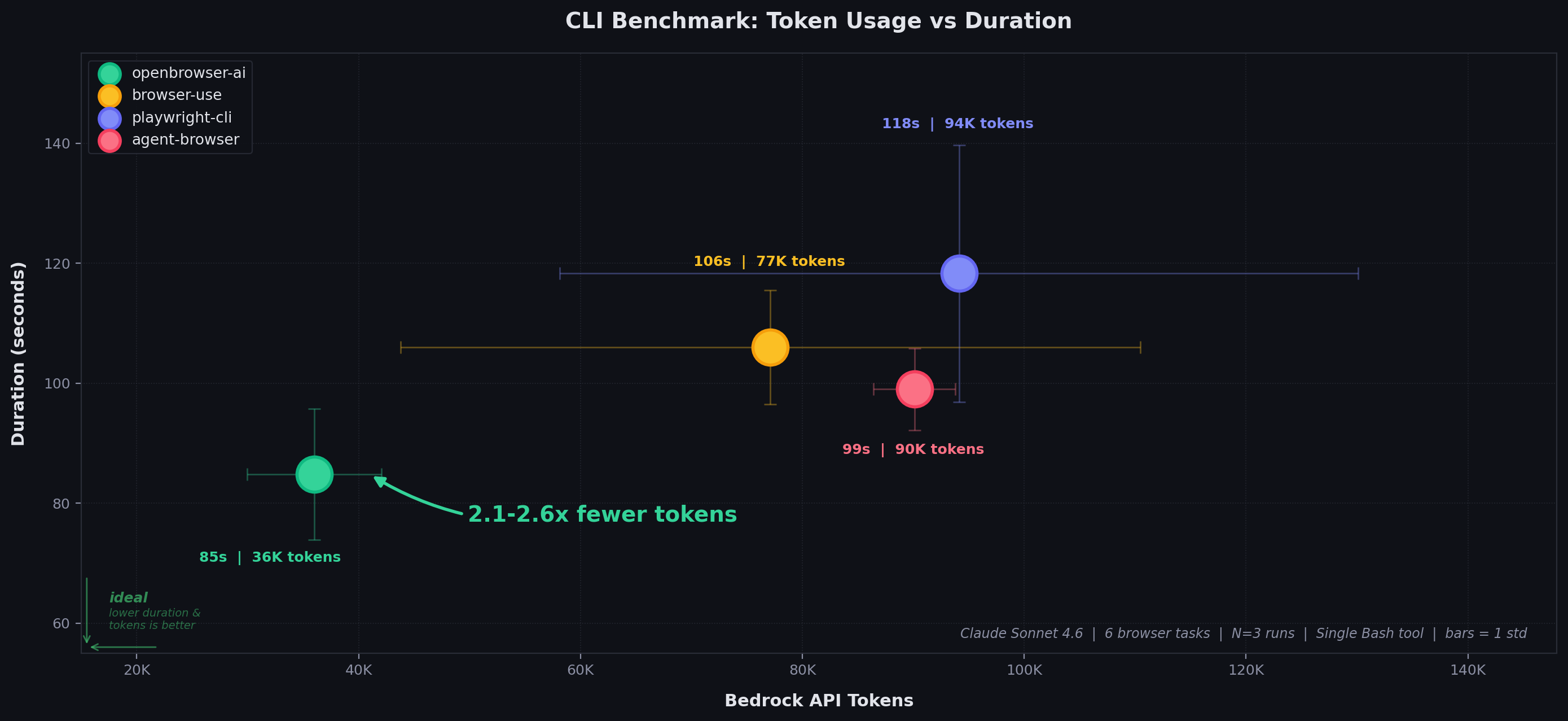
Results: Per-Task Token Usage
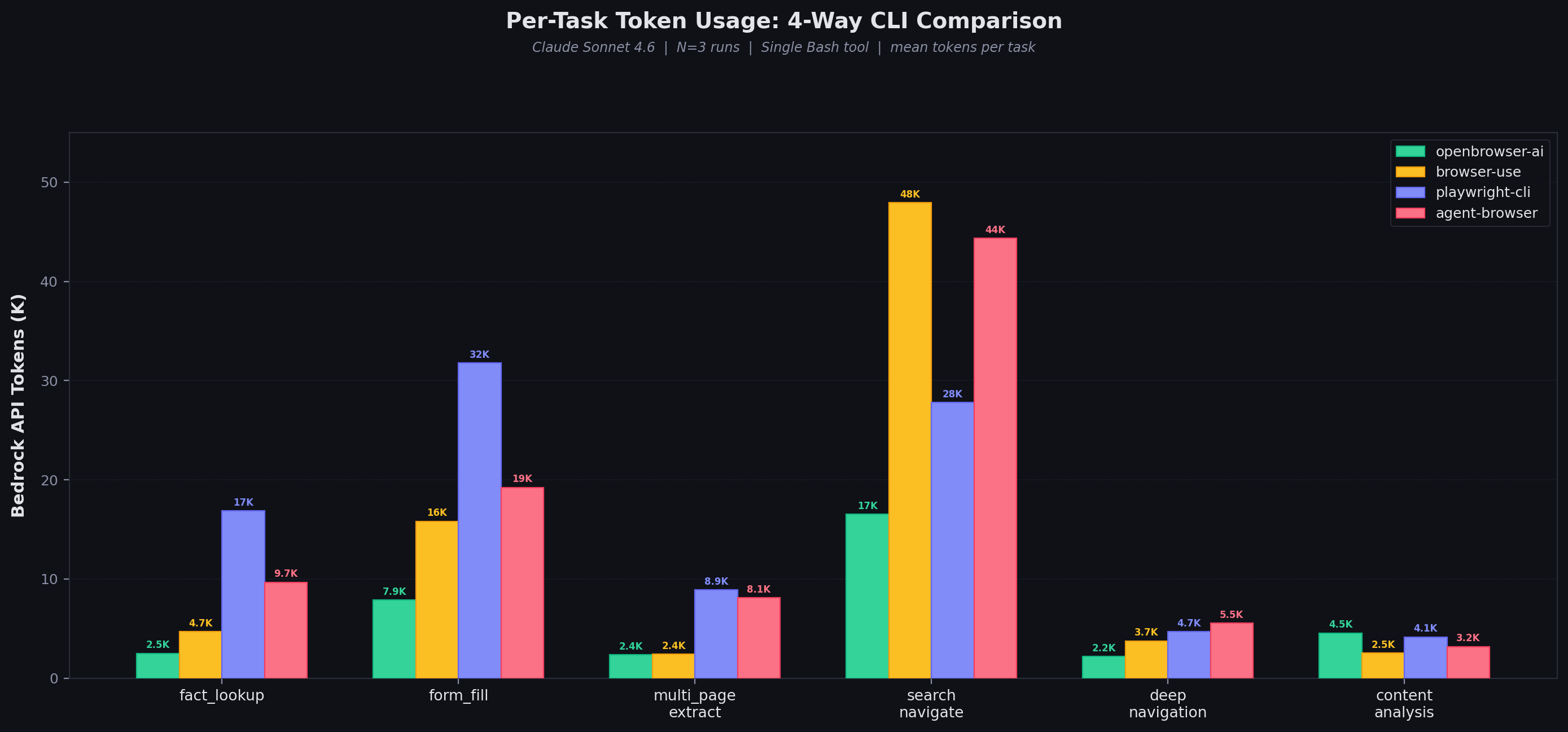
openbrowser-ai wins 5 of 6 tasks on tokens. The advantage is largest on complex pages (search_navigate: 2.9x fewer tokens than browser-use) where code batching avoids repeated page state dumps. browser-use edges ahead on content_analysis — a trivial task where all approaches use minimal tokens.
Results: Cost Per Benchmark Run (6 Tasks)
Based on Bedrock API token usage (input + output tokens at respective rates).Why openbrowser-ai Wins
1. Python Code Batching
Multiple browser operations in a singleopenbrowser-ai -c '...' call:
2. Compact DOM Representation
Page state uses DOM with[i_N] indices at ~450 chars:
-i), or ~1,420 chars (playwright-cli a11y tree in .yml file).
3. Server-Side Processing
The LLM writes Python code that processes data server-side and returns only extracted results viaprint(). Competitors return full page state that the LLM must parse in its context window.
4. Variable Persistence
The daemon maintains a Python namespace across-c calls. Intermediate results (selectors, extracted data, computed values) persist without re-extracting:
Variance Analysis
- openbrowser-ai: Moderate variance — consistent enough for reliable cost estimation
- browser-use: High token variance (43%) driven by search_navigate task where the LLM sometimes takes extra exploration turns
- playwright-cli: High token variance (38%) driven by form_fill where accessibility tree snapshots vary in size
- agent-browser: Lowest token variance (4%) but at 2.5x the absolute token cost
How Each CLI Works
openbrowser-ai
- Persistent daemon over Unix socket
-cflag executes async Python in a persistent namespace- All browser functions available:
navigate(),click(),input_text(),evaluate(),scroll(), etc. - Variables persist across calls
browser-use
- Individual commands per operation
input <index> "text"combines click + type (optimization)- DOM with
[N]indices uvxisolation due to dependency conflicts
playwright-cli
run-codeenables JS batching (similar to openbrowser-ai’s Python batching)- Snapshots save to
.ymlfiles, requiring extracatto read - Accessibility tree format (~1,420 chars per page)
agent-browser
- Individual commands, chainable with
&& snapshot -iflag for compact output (85-95% smaller than full snapshot)- Accessibility tree with
@eNrefs evalfor JavaScript execution