

Browser Automation Comparison
Two benchmark suites measuring OpenBrowser against competitors:- CLI Benchmark (2026-03-15) — 4-way comparison of CLI tools driven by an LLM via a single Bash tool
- MCP Benchmark (below) — 3-way comparison of MCP servers as tool providers
MCP Server Comparison
Benchmark date: 2026-02-21 | OpenBrowser MCP v0.1.26 (CodeAgent, 1 tool) | Playwright MCP (latest) | Chrome DevTools MCP (latest)Overview
Three approaches to browser automation via MCP, measured on identical tasks.Token Usage Benchmark
Methodology
All three MCP servers were started as subprocesses and tested via JSON-RPC stdio transport. Same 5-step workflow, same pages, same measurement method. All numbers are real measurements, not estimates. Workflow: Navigate to Wikipedia Python page -> get page state -> click link -> go back -> get state again.Results: 5-Step Workflow on Wikipedia (Complex Page)
Results: Small Page (httpbin.org/forms/post)
Per-Operation Token Breakdown (Wikipedia)
Why the Difference
Playwright MCP: Every navigation returns the full page accessibility snapshot (~124K tokens for Wikipedia). Consistent, but forces the LLM to process the entire page with every action.
Chrome DevTools MCP: Returns minimal confirmations for navigation. The agent must explicitly call
take_snapshot to see the page (~135K tokens for Wikipedia). One snapshot is comparable in size to Playwright’s, but actions don’t auto-return snapshots.
OpenBrowser MCP: Actions return minimal confirmations. The agent explicitly requests the level of detail it needs — from 105 tokens (compact state) to 3,981 tokens (targeted search) to 25,164 tokens (full page text). More tool calls, dramatically fewer tokens.
What Each Server Returns (Verbatim)
All responses below are real output captured from each MCP server on the httpbin.org/forms/post page.Navigate
Playwright MCP — returns full a11y snapshot with every navigation (~2,150 chars on httpbin, ~496K chars on Wikipedia):Get Page State / Snapshot
Playwright MCPbrowser_snapshot — full a11y tree again (~1,896 chars on httpbin, ~495K chars on Wikipedia):
take_snapshot — full a11y tree (~1,214 chars on httpbin, ~538K chars on Wikipedia):
Click / Type / Go Back
All three servers return short confirmations for actions:Targeted Extraction (OpenBrowser only)
No equivalent in Playwright or Chrome DevTools MCP — both require dumping the full snapshot or running JavaScript from the client side. Element search — the LLM writes Python to find specific elements:Cost Comparison
MCP tool response costs per 5-step workflow on a complex page (Wikipedia). These tokens are added to the LLM’s context window, charged at input token rates. All numbers based on real measurements.
Per 1,000 workflows:
E2E LLM Benchmark
Methodology
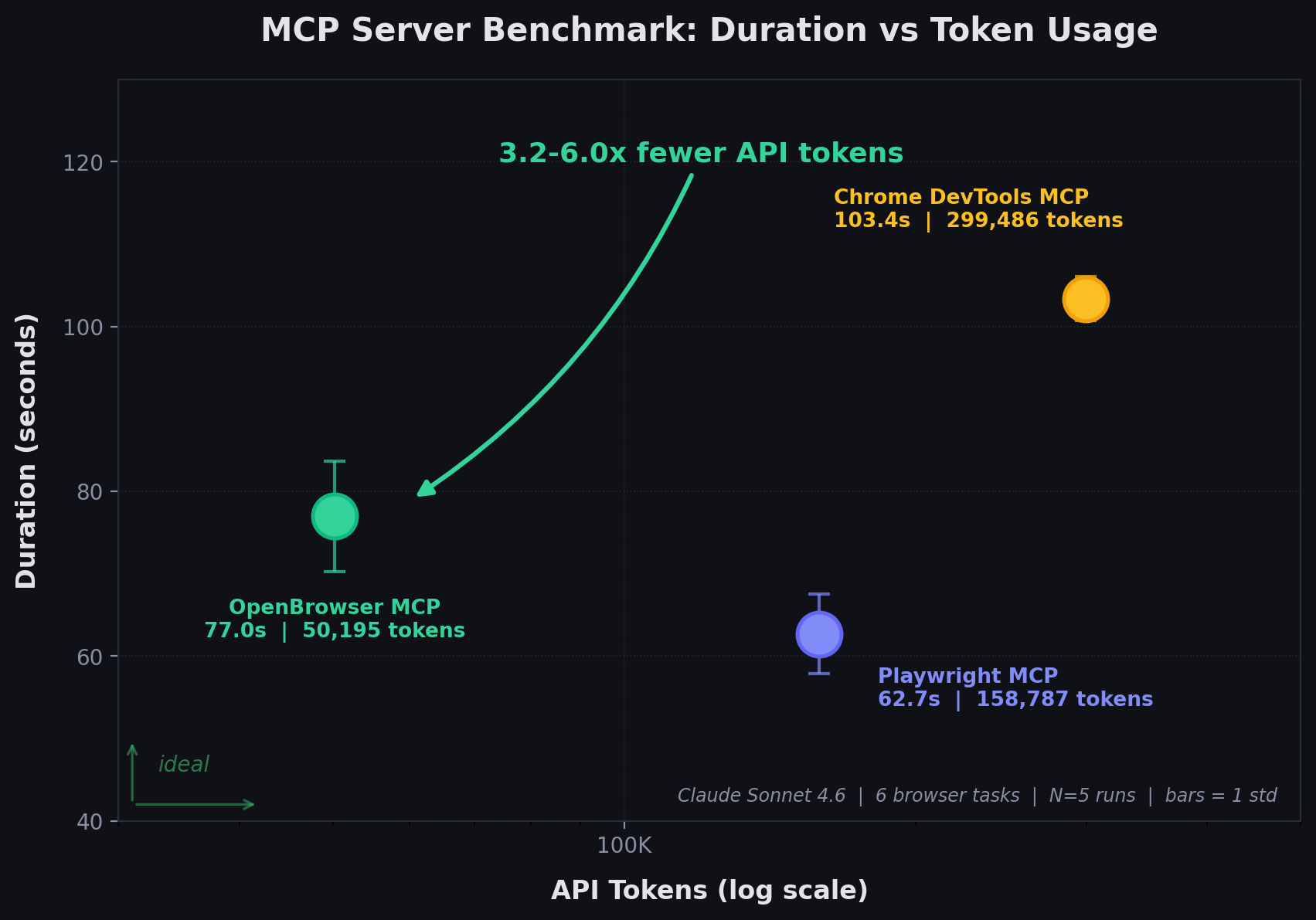
Six real-world browser tasks run through Claude Sonnet 4.6 on AWS Bedrock (Converse API). Each task uses a single MCP server as tool provider. The LLM decides which tools to call and when the task is complete. All tasks run against live websites. Tasks: Wikipedia fact lookup, httpbin form fill, Hacker News data extraction, Wikipedia search + navigation, GitHub release lookup, example.com content analysis.Results: Task Success
All three servers pass all 6 tasks.Results: Tool Calls and Duration
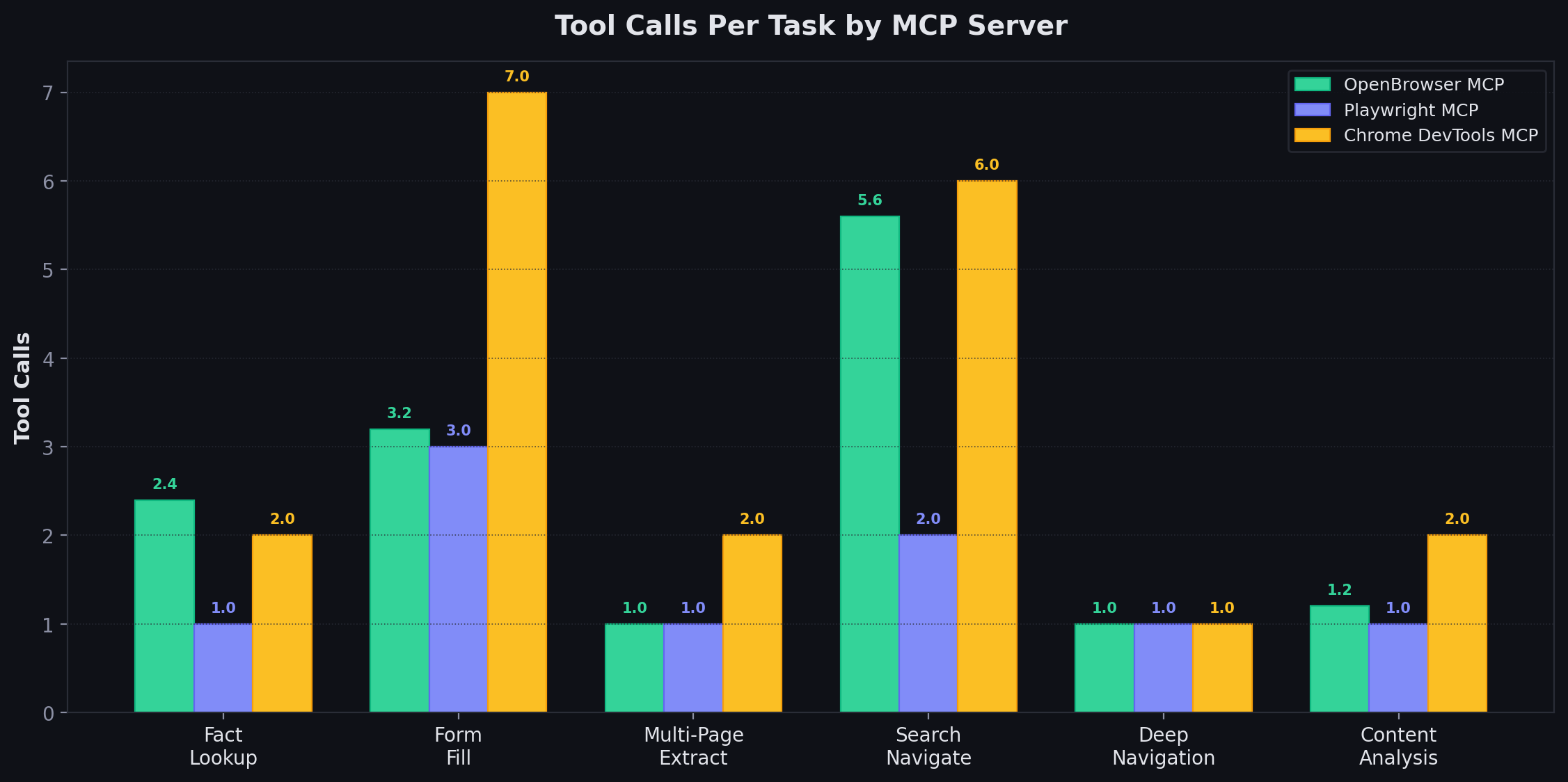
Playwright completes most tasks in 1 tool call because every navigation returns the full accessibility snapshot — the LLM sees the entire page immediately and can answer without follow-up queries. OpenBrowser takes more turns because the LLM writes code to navigate, extract, and verify data step by step.
Per-Task Duration
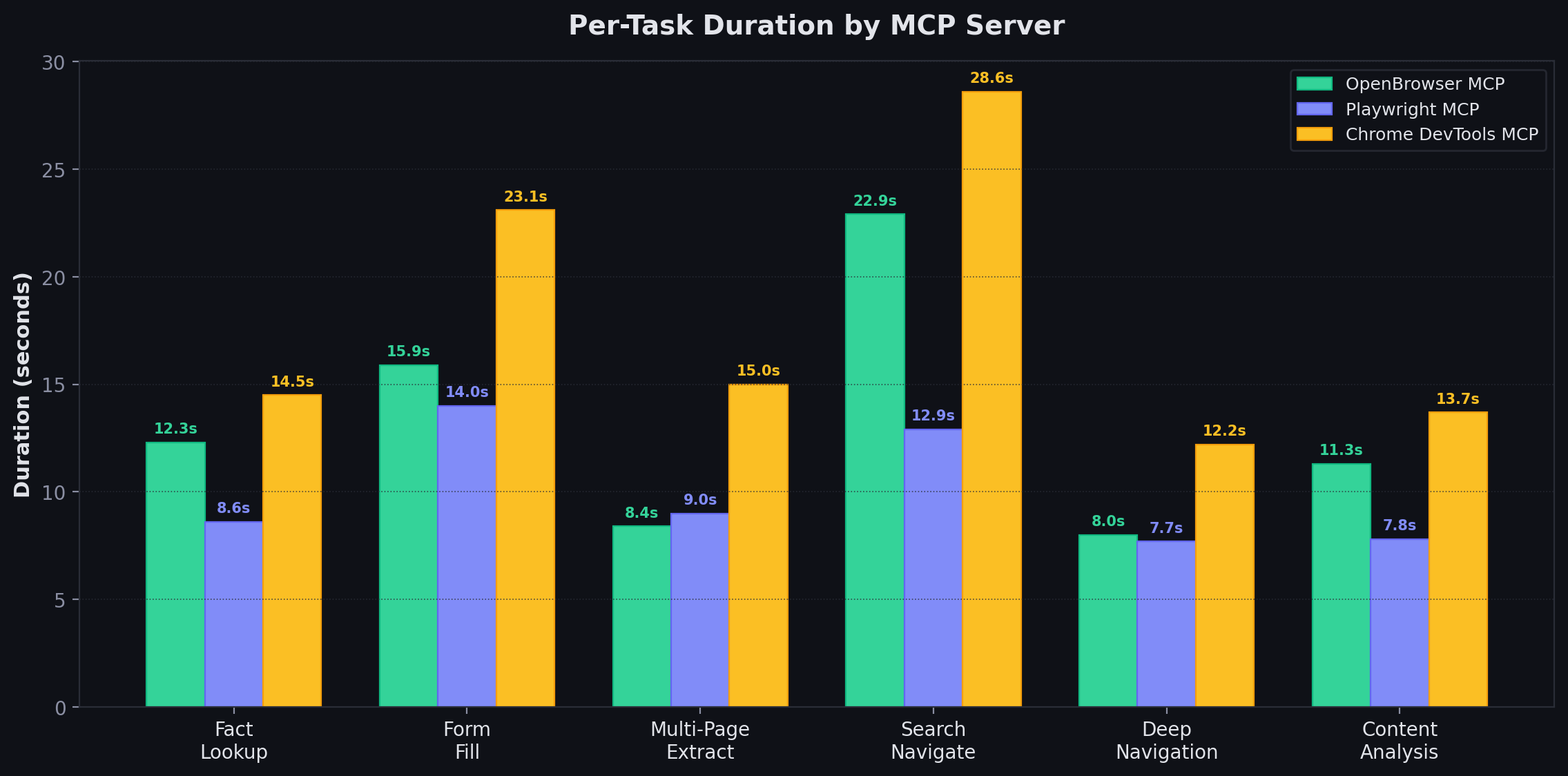
Per-Task Tool Calls
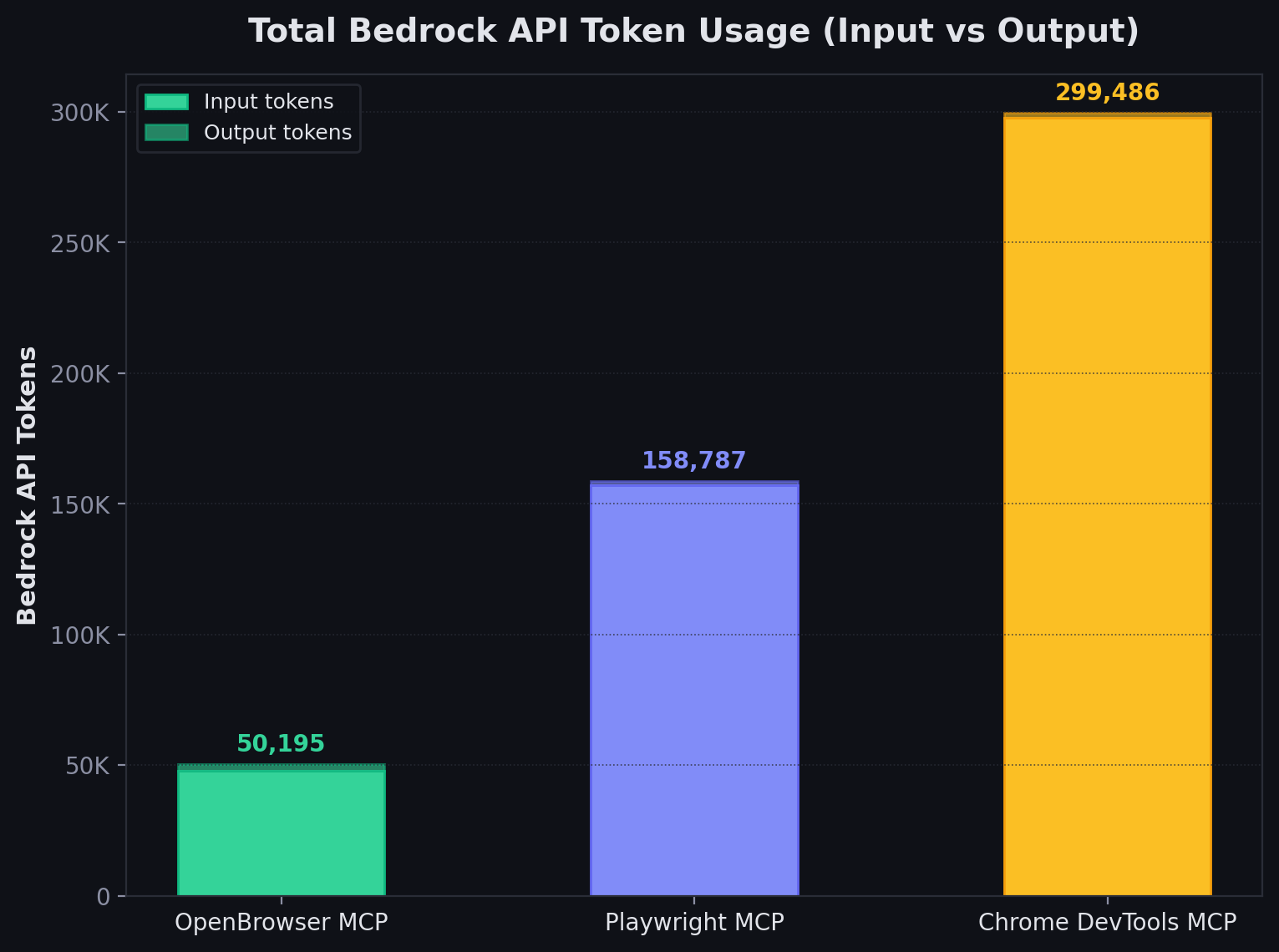
Results: Token Efficiency
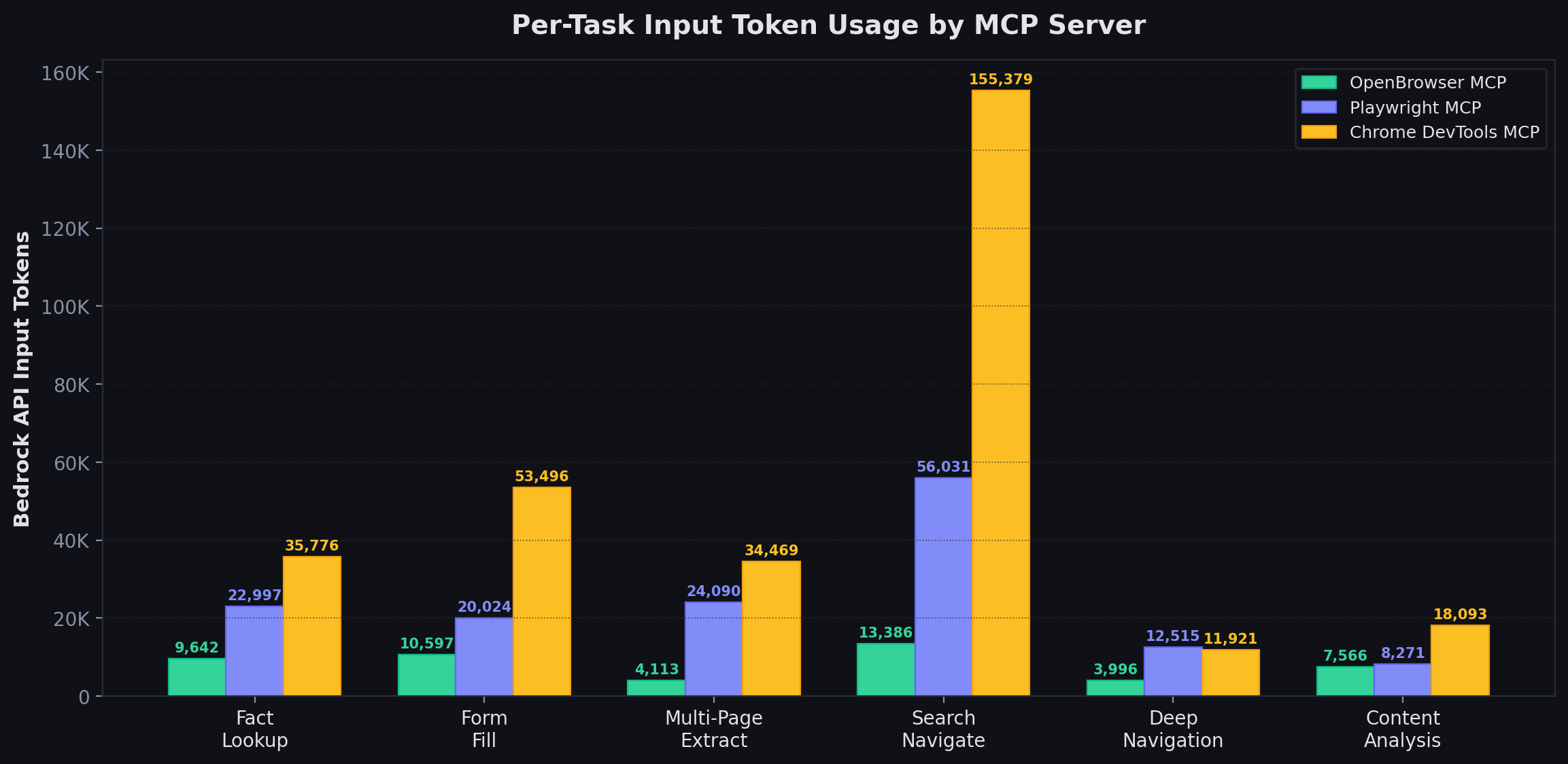
Bedrock API token usage measured from the Converse APIusage field (mean across 5 runs, 10,000-sample bootstrap CIs).
Per-Task MCP Response Size
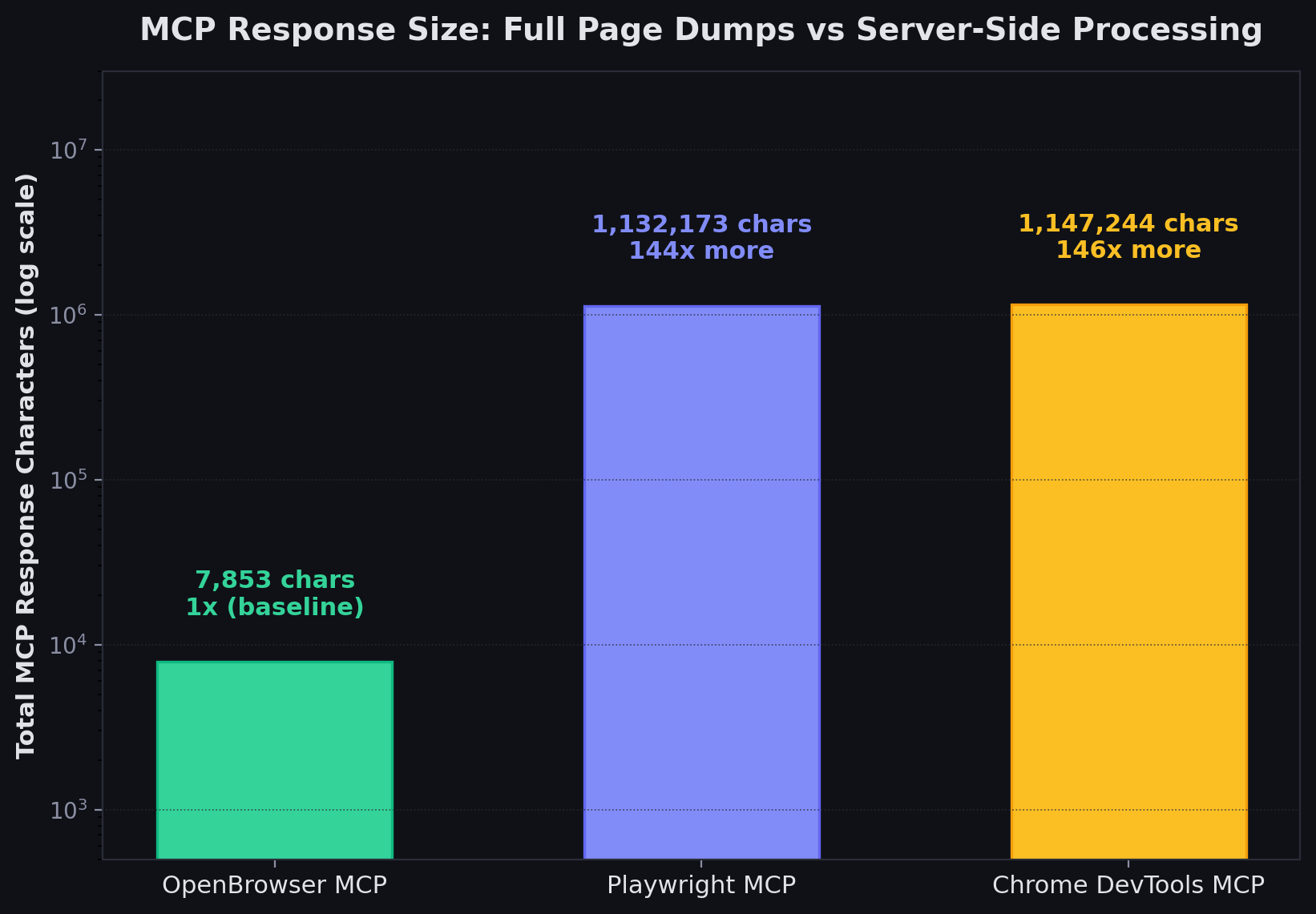
The pattern: any task involving a complex page (Wikipedia, GitHub releases) produces massive response payloads for Playwright and Chrome DevTools because they dump the full accessibility snapshot. OpenBrowser returns only the data the code explicitly extracts.
Per-Task Input Token Usage
Results: Cost Per Benchmark Run (6 Tasks)
Cost per benchmark run based on Bedrock API token usage (input + output tokens at respective rates).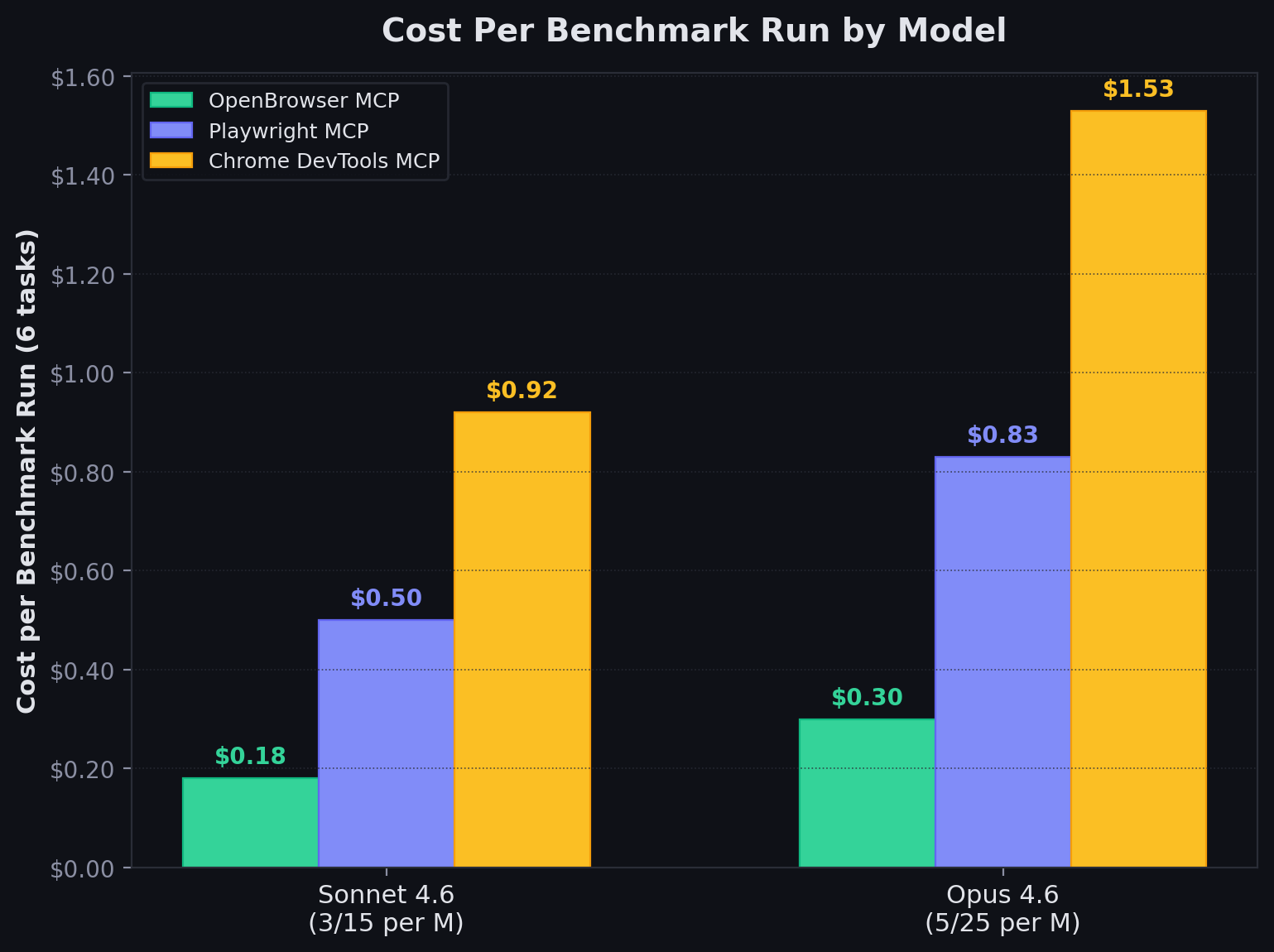
Why OpenBrowser Uses More Tool Calls but Fewer Tokens
Playwright sends the full page with every response, so the LLM gets the answer immediately but pays for ~120K tokens per Wikipedia page load. OpenBrowser returns compact results (~30-800 chars per call), so the LLM needs more round-trips to navigate and extract but pays far fewer tokens overall. For a single simple task, Playwright’s approach is fast. At scale (thousands of workflows, complex pages, multi-step agents), the MCP response size difference is 144x.Tool Surface Comparison
Playwright MCP (22 core tools, 34 total)
Navigation, interaction, form filling, file upload, drag and drop, hover, key press, select option, screenshots, snapshots, console messages, dialog handling, network requests, tab management, code execution, PDF export, wait conditions, resize, vision-mode coordinate tools, test assertions.Chrome DevTools MCP (26 tools)
Input automation (click, drag, fill, fill_form, hover, press_key, handle_dialog, upload_file), navigation (navigate_page, new_page, close_page, list_pages, select_page, wait_for), emulation (emulate, resize_page), performance tracing (start/stop/analyze), network debugging (list/get requests), JS execution, console messages, screenshots, DOM snapshots.OpenBrowser MCP (1 tool — CodeAgent)
Unique to OpenBrowser
Features no competitor offers:- CodeAgent architecture — single
execute_codetool runs Python in a persistent namespace. The LLM writes code to navigate, extract, and process data rather than calling individual tools. Variables and state persist between calls. - 144x smaller MCP responses — returns only the data the code explicitly extracts, not full page dumps
- JS evaluation with Python processing —
await evaluate("JS expression")returns Python objects directly (dicts, lists, strings), enabling pandas/regex/json processing in the same code block - Built-in libraries — json, pandas, numpy, matplotlib, csv, re, datetime, requests, BeautifulSoup available in the execution namespace
- File system access —
file_systemobject for reading/writing local files from browser automation code - Dropdown support —
select_dropdown()anddropdown_options()for native<select>elements - Task completion signal —
done(text, success)to explicitly mark task completion with a result
Gaps vs Competitors
Benchmark Methodology Notes
Token Usage Benchmark (5-step workflow)
- All three servers benchmarked via JSON-RPC stdio subprocess — no estimates
- Response sizes measured as total JSON-RPC response character count
- Estimated tokens = characters / 4 (standard approximation for mixed English/JSON)
- 5-step workflow uses matched operations: navigate, get state/snapshot, click, go back, get state/snapshot
- Raw benchmark data:
benchmarks/playwright_results.json,benchmarks/cdp_results.json,benchmarks/openbrowser_results.json
E2E LLM Benchmark (6 real-world tasks, N=5 runs)
- Model: Claude Sonnet 4.6 on AWS Bedrock (Converse API)
- Each task uses a single MCP server as tool provider via JSON-RPC stdio
- The LLM autonomously decides which tools to call and when the task is complete
- 5 runs per server, 10,000-sample bootstrap for 95% confidence intervals
- 6 tasks: fact_lookup, form_fill, multi_page_extract, search_navigate, deep_navigation, content_analysis
- All tasks run against live websites (Wikipedia, httpbin.org, news.ycombinator.com, github.com, example.com)
- Bedrock API token usage measured from the Converse API
usagefield (actual billed tokens) - MCP response sizes measured from tool response character counts
- Playwright MCP tested via
npx @playwright/mcp@latest - Chrome DevTools MCP tested via
npx -y chrome-devtools-mcp@latest - OpenBrowser MCP v0.1.26 tested via
uvx openbrowser-ai[mcp]==0.1.26 --mcp - All tests run on macOS, M-series Apple Silicon
- Benchmark scripts:
benchmarks/e2e_llm_benchmark.py,benchmarks/e2e_llm_stats.py - Results:
benchmarks/e2e_llm_stats_results.json